
Source projects & linked targets
When several teams translate the same source text into different languages, Aquilla has two ways to organize that work. Which one you want depends on what “the same source” means for you.
The common case: one project, many target languages
Section titled “The common case: one project, many target languages”If every team is translating the same original source text (say, one Greek New Testament translated into five languages), the recommended shape is a single project with more than one target language. The first target language you set is the project’s default lane; add more in Settings → General → Languages and each becomes its own lane. Every lane shares the same source text, so there’s nothing to keep in sync: it’s the same project.
See Creating a project for setting this up, and Files, cells & navigation for how lanes work day to day.
The chain case: source projects & linked targets
Section titled “The chain case: source projects & linked targets”Sometimes a team isn’t translating the original source: they’re translating someone else’s translation. For example, a regional-language team working from a national-language translation rather than from the original text. That’s a translation chain, and it’s what source projects and linked targets are for.
- A source project holds text that another project imports as its source.
- A linked target is a translation project that imports its source text from another project. You can link many target projects to one upstream project.
This keeps a chain in sync: the upstream text is maintained in one place, and every linked project draws from it.
When the upstream text changes
Section titled “When the upstream text changes”Upstream text can be corrected or revised. When the text behind a cell changes, Aquilla puts a stale-source marker on the matching cell in each linked target project.
The marker is a gentle “please look at this” signal: it tells the translator that the source they translated from has moved, so the existing translation may need a second look. It doesn’t change or discard your work: you decide whether an update is needed.
Linking a project to a source
Section titled “Linking a project to a source”You can link to a source project when you create the project: choose Linked target as the shape, pick the upstream project, and choose its translations as what becomes this project’s source: that’s the chain case. (If you’re adding a sibling language for the same source instead, Aquilla will suggest adding a target lane on the existing project rather than linking a second one.) Once linked, the source text appears in the target project ready for translation, and stale-source markers begin flowing whenever the upstream source is updated.
Linking a project you already started
Section titled “Linking a project you already started”A project that owns its own source can link to another project later, without being rebuilt. A Project Lead (or above) has two ways in:
- Project Settings → Source & sync → Link to a source project: pick the project in Source project, then choose Link source project.
- The From another project tile (marked live link) on the Import dialog. It is greyed out, with a tooltip, when the project already reads its source from another project (a project can follow only one) or when your role is below Project Lead.
Both routes ask “Which corpus should become this project’s source?”: Its Source for a sibling translation of the same original text, or One of its Targets for the chain case. Review what will be added then opens a confirm step headed “Link to {upstream}?” before anything changes. It lists the upstream’s source files with a checkbox each (all checked, plus an All files box), says how many files will be added, and marks any file that shares a name with one you already have with a same name here badge.
The link adds to your project and, unless you choose to replace, changes nothing you have. Your files, translations, and validations stay as they are. A file with a matching name arrives alongside your own, with empty translations, so that name appears twice in the file list.
To keep one copy instead, tick the checkbox “Replace the source in my existing {name} and keep its translations” on a same-named file. It is off by default. Aquilla first compares the two files (“Comparing the two files…”) and says how many lines are the same. Lines that differ take the source project’s text, and their translations are flagged as source changed. If the files are not the same material, a warning says “These two files are not the same material” and the link waits until you turn the option off, which adds the file as a separate copy. A replaced file keeps its translations, validations, and comments, and follows the live link from then on.
For the chain case, the link step also asks Which of its translations?
(placeholder “Choose a translation…”): the link reads the one you pick, and the
confirm step shows it as a “translation: {value}” badge. If the upstream has
exactly one translation you may see, it is picked for you. If it has none you can use, the
step says “This project has no translation you can use as a source. Choose its
source instead, or ask for access to one of its translations.”
If the first copy of files fails, Aquilla says “The link to the source project was saved, but its files have not arrived here yet. Try again to bring them in.” and shows a Try again button. The link stays saved. On the Source link card, a Not synced yet badge and Sync now do the same job.
Choosing which settings a link copies
Section titled “Choosing which settings a link copies”A link can also carry the upstream project’s settings. On the confirm step, Copy these from the upstream project lists what the new project can receive, with the note “Turn on what this project should receive. You can detach any of them later in its settings.” The fields are:
- Translation brief, Knowledge-base documents, and Workflow policy (validation count and role floors, self-validation, autopilot and agent mode, structural-cell counting, and check penalties): ticked by default.
- Living-memory notes, Smart quotes, and AI instructions: unticked by default. AI instructions stay off because they usually name the language pair.
A field you tick arrives as a copy. When the upstream project saves a change to
it, the copy updates, and so does the next project in the chain. In the
downstream project, Project Settings shows a “Settings from {upstream}”
card that repeats the choices, and each field still being copied (Smart quotes,
the validation settings, and others) carries a “from {upstream}” note beside
it. Detach on that note, or on the card, stops future updates for that field
and keeps your current copy, so you can then change it freely.
Choosing which files a link follows
Section titled “Choosing which files a link follows”Leave every file checked and the link follows the whole source project: files it gains later arrive on their own. Uncheck any file and the link follows only the files you picked, so later additions do not arrive. Keep at least one file checked.
The same file list appears as Files to bring in when you create a Linked Target or a Cloned copy in the Create New Project dialog. A clone copies the files you picked once and does not follow afterwards.
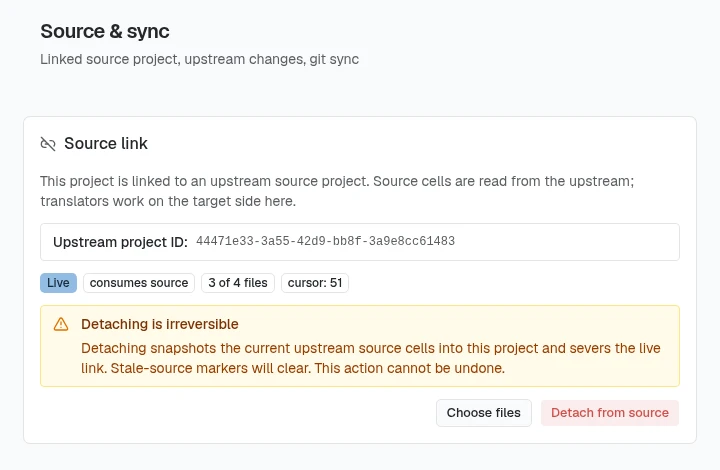
The Source link card in Project Settings → Source & sync shows how much the link follows: All files, or a count such as “2 of 5 files”. On a live link, Choose files (Project Lead or above) opens “Choose which files this link follows”. Files already followed are checked and marked already linked.
- Add files: check more of the source project’s files. Each arrives with its complete source and receives the source project’s changes from then on.
- Stop following a file: uncheck it, then choose Review changes. The file stays in your project with the source text it has now, and its translations, validations, and comments are untouched. It no longer receives the source project’s changes and shows a stopped following badge. To stop following everything, use Detach from source.
- Replace the source in a file you already have: when a file you check shares a name with one in your project, the step offers “Replace the source in this file you already have:” (for several files, “Replace the source in these files you already have:”). The body says “It stays the same file, with its translations, validations and comments on the same lines.” and “No second copy is added.”
- Follow a file again: check a stopped file. Its source text is replaced with the source project’s current text. Its translations, validations, and comments stay.
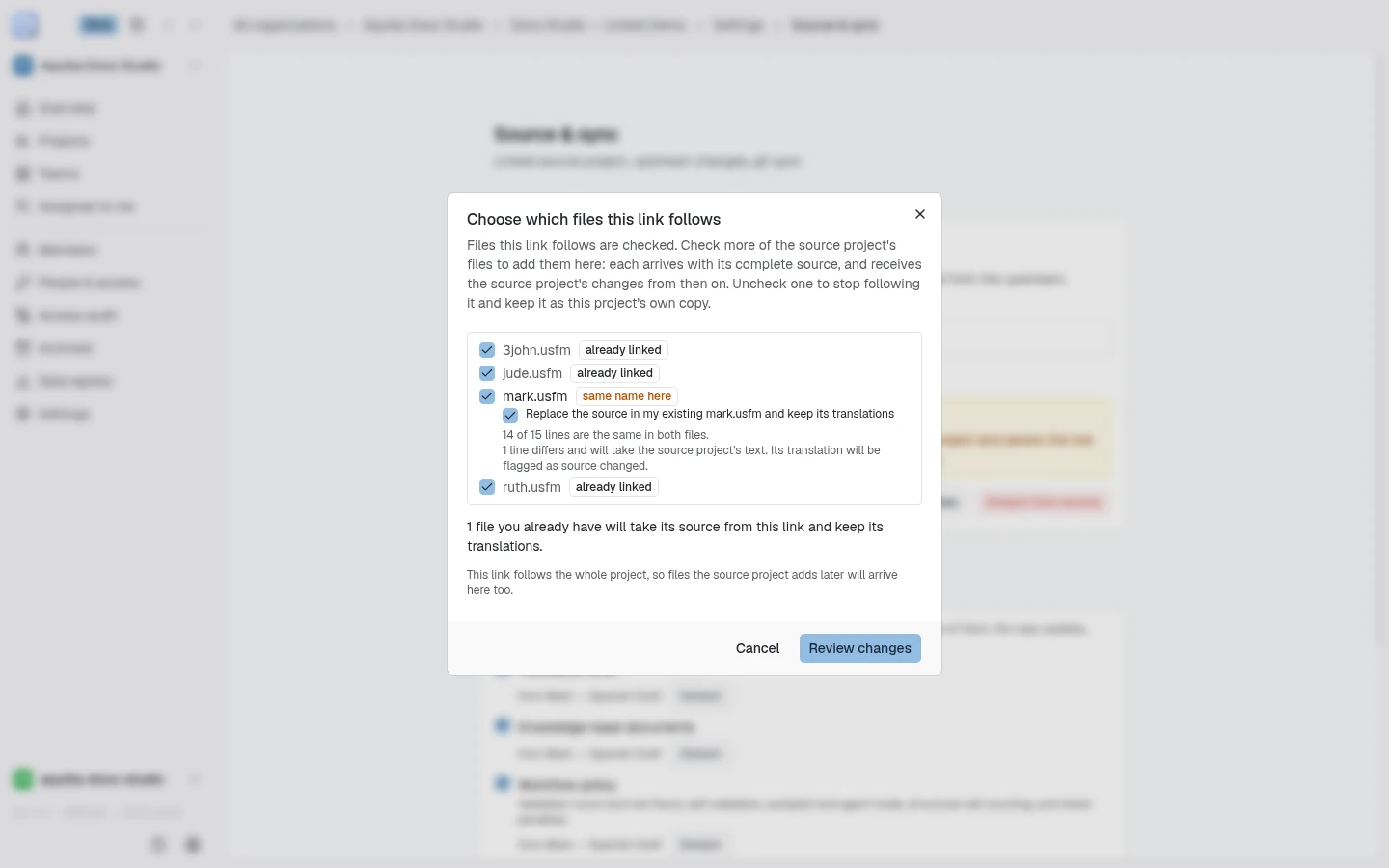
On a link that follows the whole project, stopping one file pins the link to the remaining files, and the confirm step warns you that files the source project adds later will no longer arrive on their own.
Importing a Door43 (DCS) resource as your source
Section titled “Importing a Door43 (DCS) resource as your source”A project’s source can also come straight from Door43: the door43.org Content Service (DCS) that hosts published Bible translation resources such as unfoldingWord’s texts. Linking a Door43 resource works like the chain case above: the project’s source lane mirrors the resource and stays pinned to the release you imported, so it only moves when you choose to pull an update.
Importing from Door43
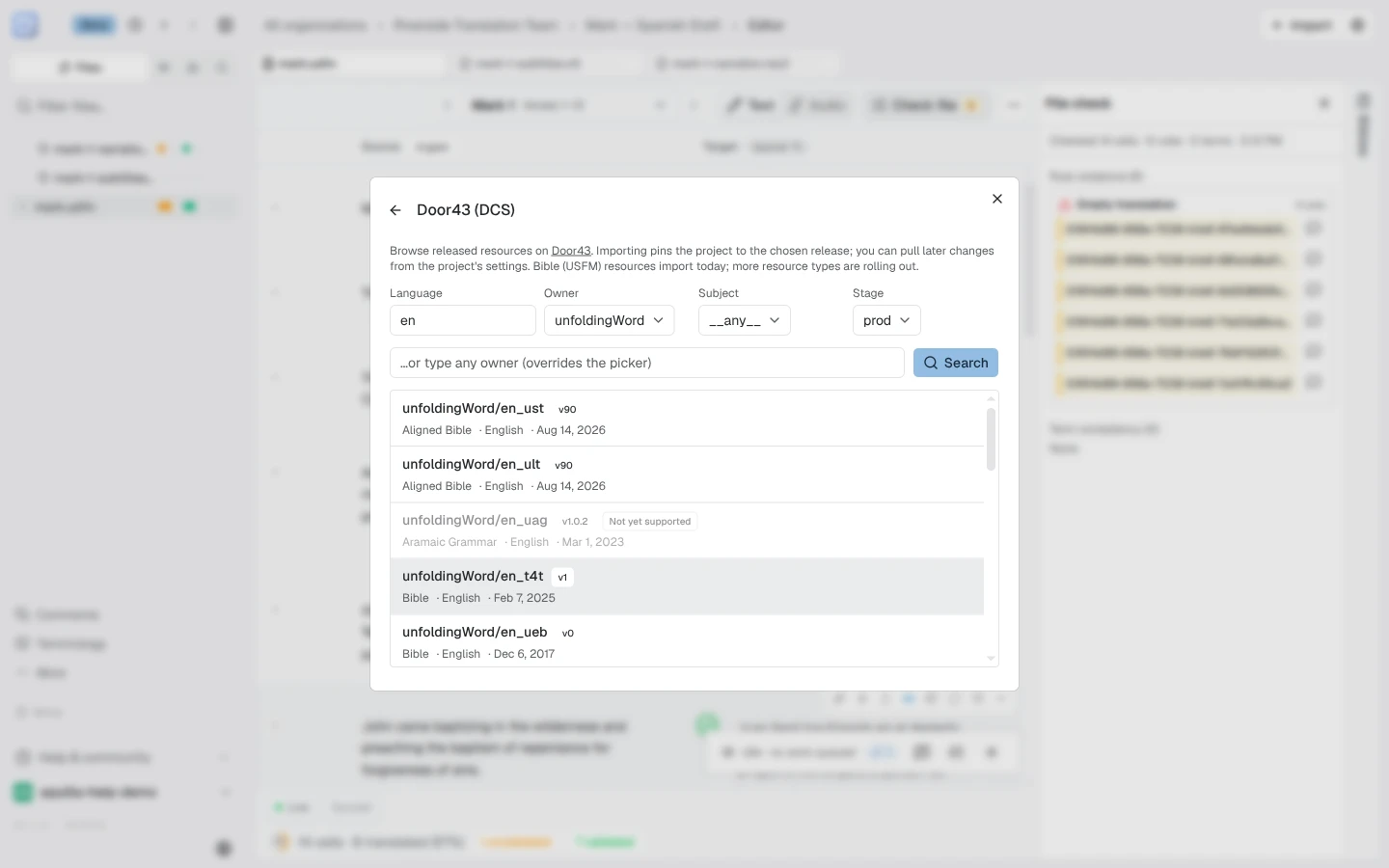
Section titled “Importing from Door43”From the Import dialog, choose Door43 (DCS) (marked beta), described as “Import any released Door43 resource as source and pin it to a release — pull upstream changes later.” It opens a catalog browser you can filter by:
- Language: type a language name such as English, and the Language code box beside it fills in the code Door43 uses. Edit the code if it is wrong for the resource you want.
- Owner: for example unfoldingWord, Door43-Catalog, STR, or a free-text owner name
- Subject: Aligned Bible, Bible, Greek/Hebrew testaments, Open Bible Stories, TSV Translation Notes/Questions, Translation Words, Translation Academy
- Stage: Released (prod) (the default), Pre-release, or Latest (HEAD)
Bibles (USFM), Open Bible Stories, and Translation/Study Notes and Questions import today. Types Aquilla can’t import yet, such as Translation Words (+Links), Translation Academy, and grammars, show greyed out with a Not yet supported badge.
Confirming an import pins the project to that release: “Pinned to release {ref}.” Pinning needs maintainer rights on the project; without them, the
import still completes but you’ll see “Imported, but couldn’t pin the
release — you may lack maintainer rights on this project.”
Working with a Door43-linked source
Section titled “Working with a Door43-linked source”A Door43-linked project shows a badge in the workspace header,
owner/repo @ ref (for example unfoldingWord/en_ult @ v89), that explains
where the source came from and when it was imported, and opens Project
Settings when clicked.
Because the link manages the source cells, source editing is locked for every role on a Door43-linked project. Where the source-edit control would normally be, a lock icon explains why: “Source is synced from Door43 — a maintainer can detach it in Project Settings.”
Managing the link: Project Settings → Door43 upstream
Section titled “Managing the link: Project Settings → Door43 upstream”Every project member can see the Door43 upstream panel in Project Settings; its actions need Maintainer or above (members below that see “Maintainer or above required to import upstream changes.”):
- Check for updates: looks for a newer upstream release and imports the changes if you choose to pull it. If some changes can’t be applied, the rest still land, the project stays pinned to its previous release, and running the update again retries just those changes.
- Re-sync content: a repair tool, not a release update: “Scans the
source at the pinned version for cells that were imported incorrectly.
Nothing is changed until you confirm.” It’s scan-then-confirm: scanning is
read-only and reports either “Everything already matches the pinned
source.” or “Scan complete:
{N}to repair,{M}new,{K}to remove.” Reviewing the scan and clicking Apply re-sync applies it; cells the scan wants to remove will hide their translations, so you’re asked to acknowledge that first. The pinned release itself doesn’t move: this is for fixing an import (say, after an upstream parser fix), not pulling new content. - Detach from upstream: permanently unlinks the project from
{owner}/{repo}and makes its source cells editable again. This can’t be undone: the project stops receiving updates, and relinking to Door43 later means a fresh import, not resuming where you left off.
Help assistant
AI answers from the Aquilla docs — may make mistakes.