
Inviting people
Bring someone into a project two ways: invite them by email from an organization’s Members page, or share an invite link directly. Both carry a role, so whoever accepts joins with exactly the access you intended.
Inviting by email
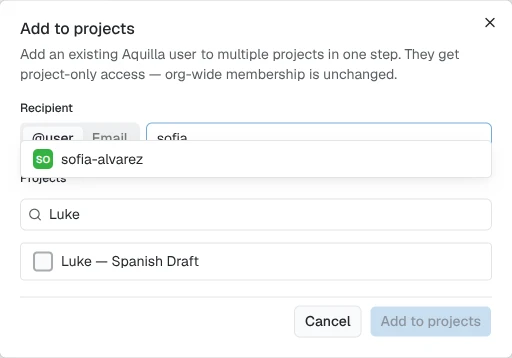
Section titled “Inviting by email”From an organization’s Members page, choose Add to projects. Pick the person, by username if they already use Aquilla, or by email if they don’t, select one or more projects, and choose a role for each. Then choose Send invites.
- If you picked an existing Aquilla user, they’re added to the selected projects right away. This grants project-only access; it doesn’t make them a member of the organization itself.
- If you entered an email address, each recipient gets one email per selected project, each with its own single-use invite link, no Aquilla account needed yet.
That lets you add a reviewer joining a multi-book effort to every project at
once, instead of project by project. A Search projects… box above the
project checklist narrows a long list; your selections stay checked as you
filter, and the count below still reads “N projects selected.” Once you
choose Send invites, a confirmation reads “Added {username} to {count}
project(s)” for an existing user or “Invite sent to {email} for {count}
project(s)” for an email invite.
Sharing an invite link
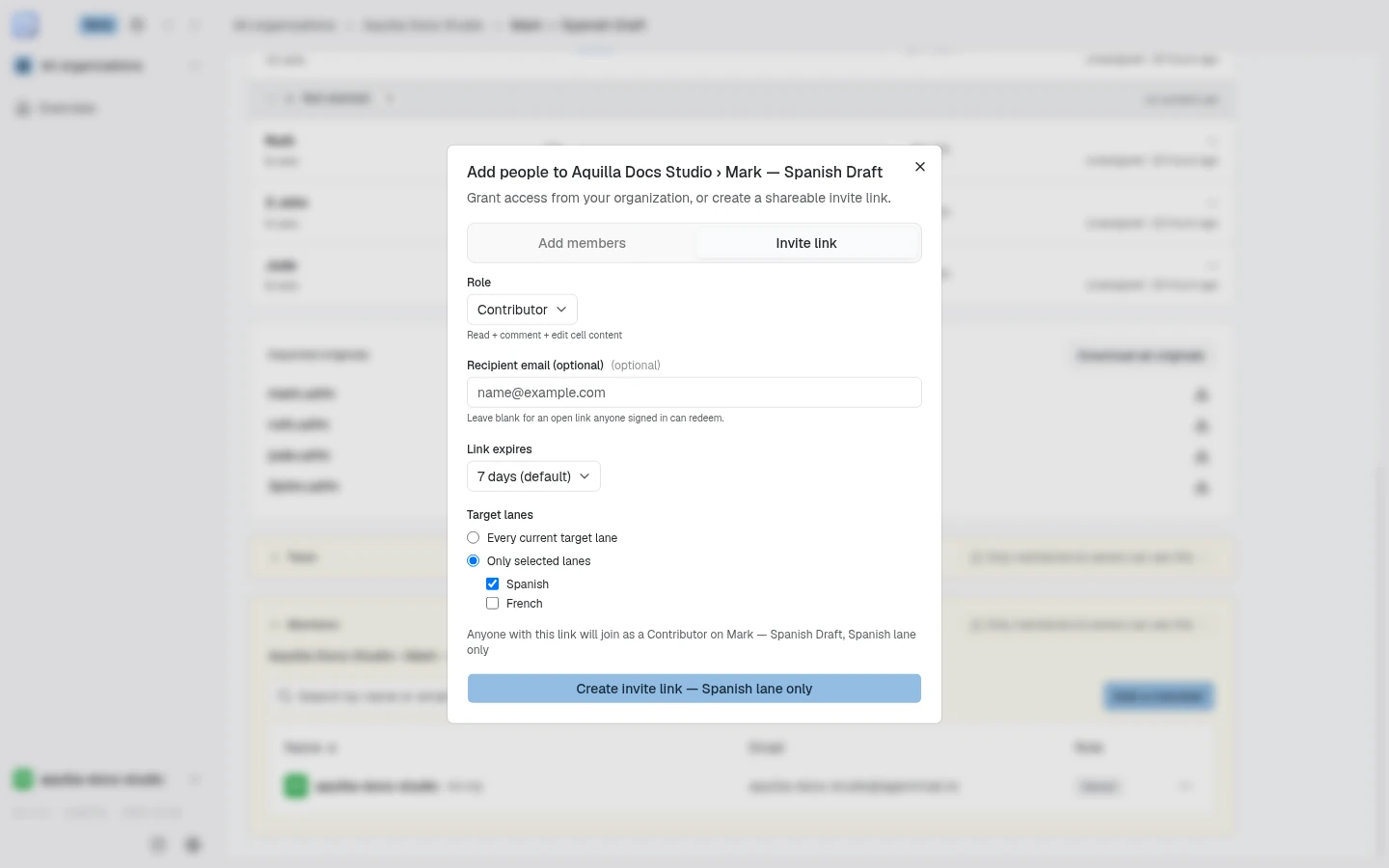
Section titled “Sharing an invite link”You can also create a link directly from the project page. On the Members card, choose Add a member, then open the Invite link tab. You don’t need the recipient’s email up front: leave Recipient email (optional) blank for an open link that anyone signed in can redeem. Choose the role it should grant: viewer, commenter, reviewer, or contributor, then share the link with your teammate however you like (email, chat, etc.). Like email invites, a shared link tops out at contributor. Link expires offers 1 day, 7 days (default), 30 days, or No expiry.
The tab also lists the project’s active links. A link limited to certain languages says so on its row, for example “Spanish lane only”.
Check the scope before you send
Section titled “Check the scope before you send”Every form that adds or invites someone states what the click will grant, in a sentence above the submit button. This covers the organization invite, a project’s member forms, the lane staffing picker, the member matrix, and invite links. The sentence names the role and where it reaches:
- “
{name}will join as a{role}of the whole organization — every project” - “
{name}will join as a{role}on{project}— every lane” - “
{name}will join as a{role}on{project},{lane}lane only”
For an invite link, the sentence starts “Anyone with this link will join as a”. Before you choose a person, it starts “They will join as a”. The submit button repeats the scope after a dash, for example “Add — every lane”, and the confirmation message repeats it again. If the scope is wider or narrower than you meant, change the role or the lane before you send.
Adding people directly
Section titled “Adding people directly”If someone’s already an Aquilla user you can see, because they already share an org or project with you, you don’t have to send them an invite at all. From a project’s Add a member dialog (its Add members tab), a project’s full Members page, or an organization’s Members page, search for people by username; matching people appear as checkboxes as you type, so you can pick more than one at once. Selected people collect as removable chips above the search box. Choose one role for the whole batch and choose Add: everyone you picked is granted access in a single step, no invite link or accept click needed.
Searching only surfaces people who already share an org or project with you. If you search a real
username you can’t see that way, Aquilla still recognizes it: “Not among people who share an org
or project with you, but {username} is an Aquilla user,” with an Add {username} option to
add them anyway by their exact username. A name that matches no Aquilla account at all instead
reads “No Aquilla user named {name}.”
Staffing someone onto a specific lane
Section titled “Staffing someone onto a specific lane”From the project overview’s Languages table (a row’s Staff… action), or from a project’s lane rows in the organization’s project table, a Staff [lane] picker adds someone and gives them that lane in one step. It searches your organization’s members and the people already on the project, including direct invites who are not on the organization roster. For anyone on neither list, it links to the project’s Members page so you can invite them from there instead: see Inviting by email above. Lane access & staffing walks through it. The picker only adds contributors and reviewers. To make someone a Project lead, use the project’s Members page, where you choose their lanes.
When your organization hides its member list, the picker shows “Your organization hides its member list. Invite the person to the project instead.” or “You can staff this lane, but you can’t see this organization’s member list. Invite the person to the project instead.”
In the Add a member dialog, the role picker stops at your own project role, because the server refuses to grant access higher than what you hold yourself. Granting membership needs Project lead access or above.
When you add or invite someone at a role below Maintainer (a Project lead included), the form asks which Target lanes they get: Every current target lane, or Only selected lanes with a checklist. Nothing is chosen until you pick, and the scope sentence above the button follows your choice, such as “on Mark, Spanish lane only”. See Choosing lanes when you add or invite someone.
What happens when someone joins
Section titled “What happens when someone joins”Opening an invite link, whether it arrived by email or was shared directly,
shows the recipient a preview before they join: the project (or projects) and
organization name, “Invited by {name}” when the inviter is known, and
“you’ll join as {role}.” An email-bound invite also shows
“invitation sent to {email}.”
- If they’re signed out, they sign in or create an account right on that page;
- once signed in, they choose Accept invitation: access is only granted on that click, so joining is always a deliberate, visible step; and
- they land in the project ready to work at the level you granted.
Help assistant
AI answers from the Aquilla docs — may make mistakes.