
Built-in checks
Aquilla runs a set of built-in checks over your cells to catch likely problems early. Most of them run continuously as you work, so issues surface as they appear rather than in a separate “lint” step. You can also run a one-off pass on demand: see Checking a file on demand below.
What the checks look for
Section titled “What the checks look for”The built-in checks fall into two severities. Major checks flag likely real problems:
- Empty translation: the source has content but the target is blank.
- Identical to source: the target matches the source verbatim, so it’s probably untranslated.
- Placeholder integrity: tokens like
{name},<tag>, or%sin the source are missing from the target. The warning names exactly which placeholder is missing, for example “Placeholder{name}missing in translation”, so you spot it at once. - Number integrity: numerals in the source don’t appear in the target. It reads digits in any script, so a source “40” matches the same number written ٤٠, ۴۰, ၄၀, or ๔๐ in the translation.
Minor checks flag smaller slips:
- End punctuation: the source ends in
?,!, or.and the target should match. It judges the translation by the target language’s own marks, so Arabic؟or Greek;count as a match, and a language such as Thai that normally ends sentences with no mark is not flagged. - Punctuation integrity: clause punctuation (
:or;) in the middle of the source should also appear somewhere in the translation. This catches mid-cell drops that the end-punctuation check can’t see; full-width marks (:,;) count as a match. It follows the same language conventions as End punctuation. - Extra numbers: the opposite of Number integrity. A number in the translation does not appear in the source, which catches a number the translator added. It is minor because an added number is sometimes right, and you can switch it off.
- Capitalization: a lowercase letter where a capital is expected, at the start of a sentence or at the start of a paragraph or heading after its marker. If the source does the same thing as often, the check stays quiet.
- Footnote quote: text that a footnote or cross-reference quotes from the
verse (the
\fq,\fk,\xq, and\xkfields) must appear in that verse’s translation. The check compares against the same cell’s verse text, never the source, so editing the verse so a quote no longer matches flags the note. - USFM markers: “Markers in the translation must be ones USFM defines, and paired markers must be closed.”
- Extra whitespace, repeated word, unpaired brackets, and abbreviation pass-through.
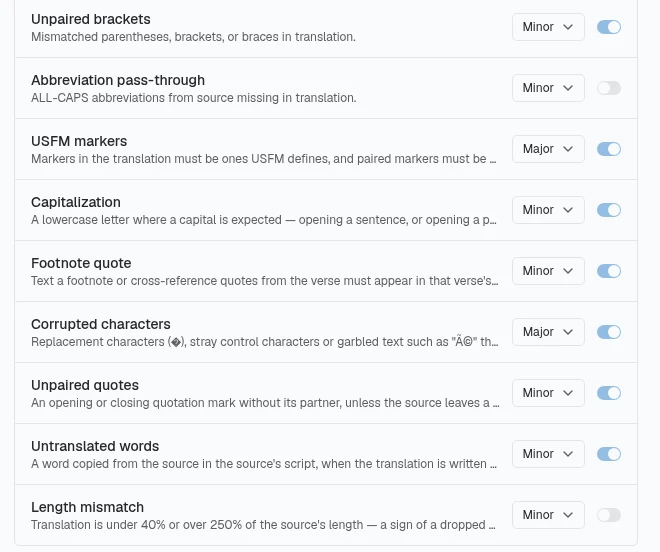
- Corrupted characters: replacement characters (�), stray control characters or garbled text such as “é” that the source doesn’t have.
- Unpaired quotes: an opening or closing quotation mark without its partner, unless the source leaves a quotation open too.
- Untranslated words: a word copied from the source in the source’s script, when the translation is written in a different script.
- Length mismatch: the translation is under 40% or over 250% of the source’s length, a sign of a dropped or added clause. It is off by default, because normal length varies by language pair.
The checks are listed, each with an on/off switch and a severity, in the Quality area of Living Memory (see Translation quality).
A project can also add its own rules on top of these (and import them from a style guide), so the catalogue grows with your team’s conventions.
The two punctuation checks note which marks they are using: “Using {language} punctuation conventions.”, “Using the punctuation from the Language profile.”, or, for a language with no special marks of its own (Spanish or English, for example), “Judged by the source’s own marks. {language} has no special punctuation conventions.” Only a lane that records no language at all reads “Judged by the source’s own marks — this lane records no language.” You can set the marks yourself in the Punctuation row of the Language profile in Project Settings; what you enter wins over the language’s defaults. On a project with several target languages, the switches and severities on this page belong to one language at a time (“These switches apply to the {lane} lane only. Other lanes keep their own.”), so a check can be off for one language and on for another.
Checking a file on demand
Section titled “Checking a file on demand”Alongside the checks above, which run continuously in the background, the editor’s ⋯ menu has a Check file item that runs a deterministic pass over the open file right now and opens a File check panel. This is useful when you want a fresh read on a whole file before handing it off, rather than waiting for issues to surface cell by cell.
The panel also groups capitalization findings under Capitalization (n), including a word that has a capital inside it (such as “tHe”) and a heading that starts with a lowercase letter. A form that recurs through the text, such as a noun-class prefix or a brand name, is not flagged; the panel lists it as the project’s own spelling.
Check-file results are for your session only: they aren’t saved or shared with teammates. The panel’s header reports what ran, for example “Checked 14 cells · 10 rules · 0 terms”. A Re-run file check button in the panel lets you refresh the results without closing and reopening it.
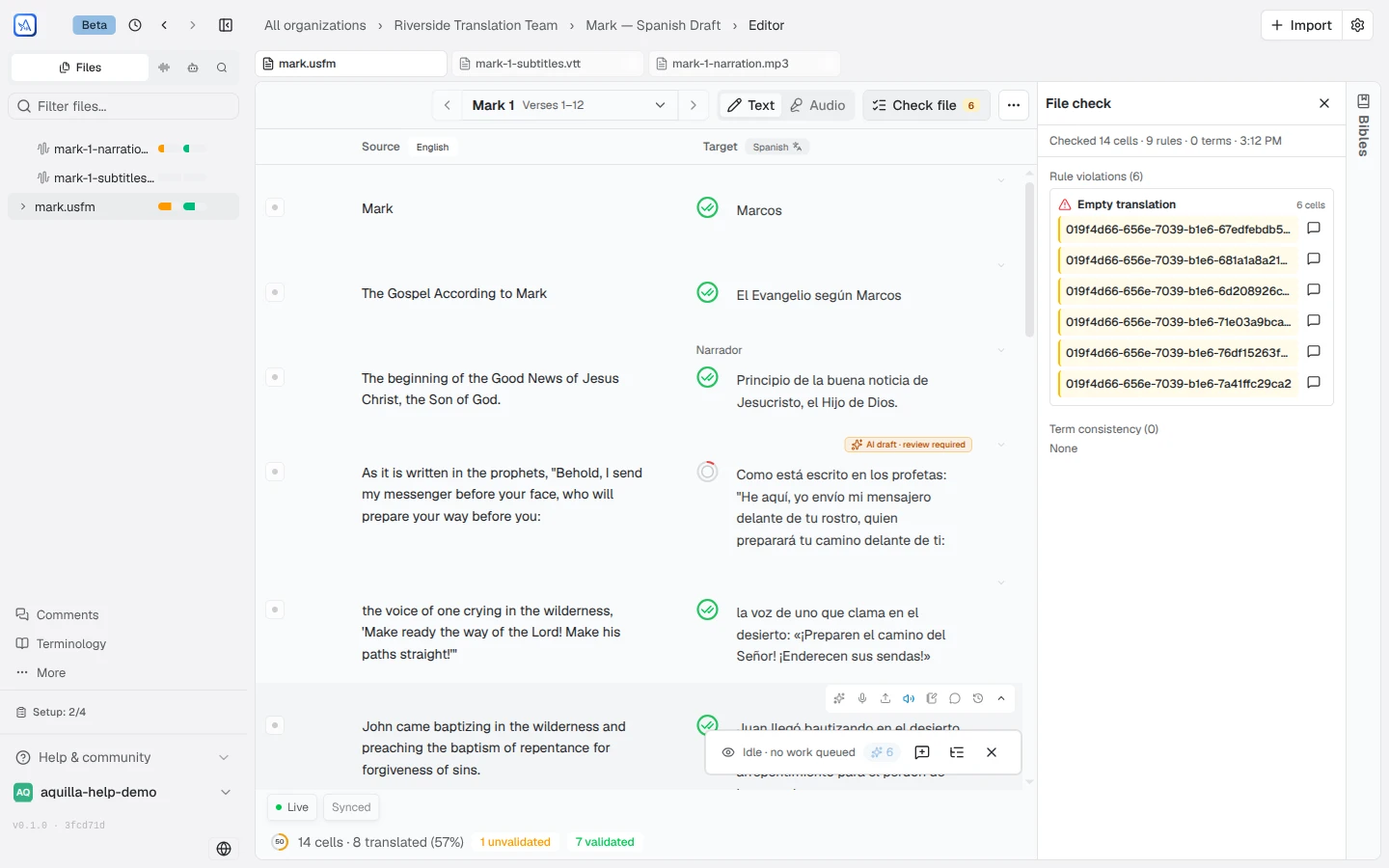
The on-demand pass also runs a term-consistency scan: for each active terminology concept, it flags cells whose translation doesn’t use any of the approved renderings, grouped by term: for example, “Χριστός: 14 of 18 occurrences use ‘Kristo’, 4 use something else.”
A rule’s underline stays on a source cell after you edit it, and on a source cell imported with formatting, so you keep seeing which words a rule flagged.
The violations inbox
Section titled “The violations inbox”When a check finds something, it creates a violation. All violations collect in a single Violations inbox that you can sort and filter: by check, by file, by severity, or by status. It’s your one place to see “what looks off across this project.”
The severity colour
Section titled “The severity colour”On a cell, a coloured marker shows whether the cell has a violation and how serious it is: red for a major issue, amber for a minor one, and nothing when the cell is clear. The same signal appears in both the cell list and the single-cell editor, so you can spot problem cells at a glance.
Hovering a flagged cell shows the check name and a plain-language reason it fired, for built-in integrity checks and custom rules alike. For example, End punctuation shows “Terminal punctuation differs from source”. The line number tints, and hovering it or the cell’s health ribbon lists every check the cell breaks. To see every cell breaking a rule and fix them with AI, see Rule flags & fixes.
Resolving a violation
Section titled “Resolving a violation”For each violation you can:
- Fix the cell: edit it so the check passes; the violation clears on its own.
- Apply an autofix: when a rule has an autofix defined, accept its suggested correction in one step.
- Waive it: mark the violation as a false alarm so it stops flagging. When a check finds the same problem more than once in a cell, the Issues tab lists each finding on its own row, quoting the text it matched, so waiving one leaves the others flagged.
- Tune the rule: adjust a check’s severity, or add and edit rules, in the project’s Rules area.
Checks don’t affect health
Section titled “Checks don’t affect health”Violations are tracked separately from decay and health. A violation does not lower the Health Ring: checks answer “does this cell look like it has a problem?”, while health answers “has this been validated?” Keeping them separate means a single empty cell doesn’t distort your overall review progress.
Help assistant
AI answers from the Aquilla docs — may make mistakes.