
Organization settings & billing
Everything an organization decides once, for everyone, lives under Settings in the org sidebar. The index groups the sections in two lists: Organization (Identity, Security, Billing & usage, AI provider keys, Rules, Knowledge base, Monday.com, Airtable) and People & Projects (Members, Teams, Project defaults, Archived projects). Opening these pages needs Maintainer access or above in the organization.
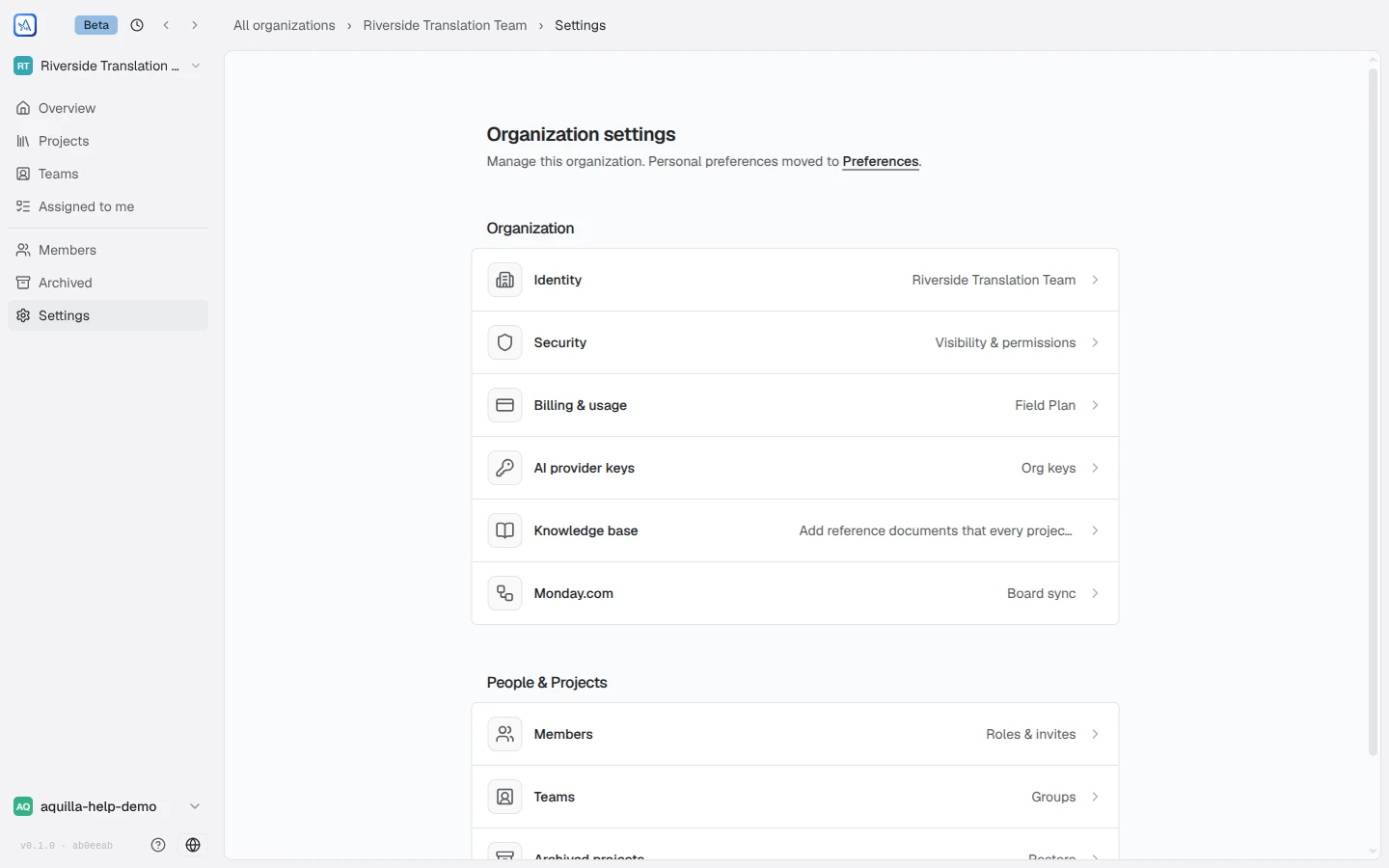
Identity
Section titled “Identity”The organization’s name, “Shown across the workspace.” Renaming takes effect for everyone immediately. An organization with no chosen name yet shows as “Organization” wherever its name would appear, such as the org switcher, until someone sets one.
Security
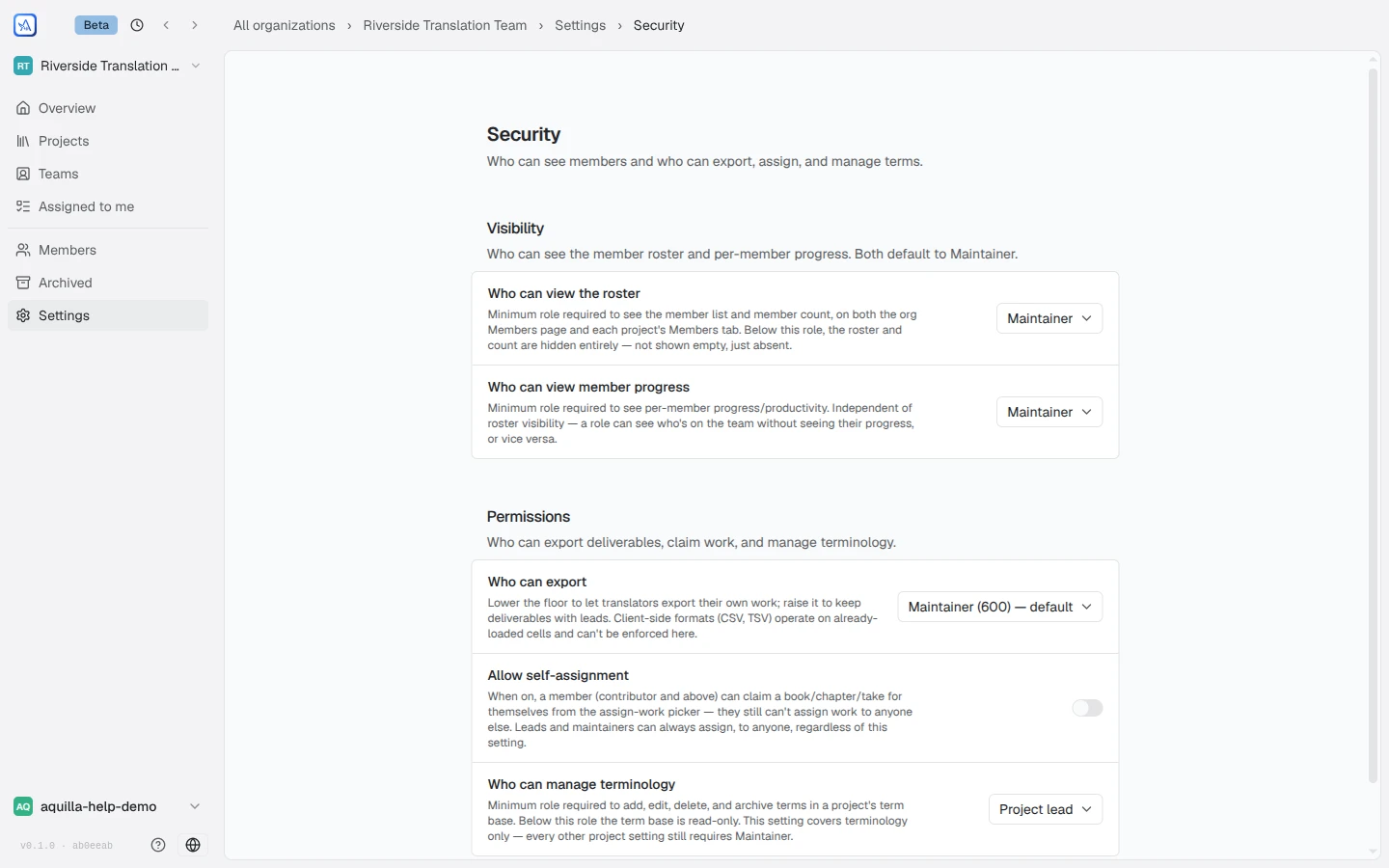
Section titled “Security”Security is where an organization sets its floors: the minimum role a person needs before something becomes visible or allowed. Three groups:
Visibility — “Who can see the member roster and per-member progress. Both default to Maintainer.”
- Who can view the roster: below this role, member lists and counts are “hidden entirely — not shown empty, just absent.”
- Who can view member progress: independent of roster visibility, so an org can show who is on the team without showing how fast anyone works.
Comments — “Who can take part in comment threads on this org’s projects. Only org owners can change these.”
- Who can comment: the floor for opening a thread or posting a reply. Below it, comment threads are read-only. Defaults to Commenter.
- Who can resolve others’ threads: the floor for resolving or reopening a thread someone else opened; whoever opened a thread can always resolve their own, whatever this is set to. Defaults to Contributor. See Comments.
Permissions — “Who can export deliverables, claim work, and manage terminology.”
- Who can export: lower it to let translators export their own work, raise it to keep deliverables with leads.
- Who can use Data egress: the minimum role that can open the organization-wide Data egress page and download everything as one archive. Owners can always open it; each project’s own export permission still governs what ends up in the archive.
- Who can assign work: the minimum project role that can assign, reassign, or unassign file, chapter, target-lane, and AI-review tasks. Defaults to Project lead.
- Allow self-assignment: lets Contributors and above claim work from the assign-work picker themselves. See Teams & assignments.
- Allow lane coordinators to assign work: when on, a member (Contributor or above) who is limited to specific target languages can assign work to other people, but only within those languages. Give a mentor or coordinator the languages they look after on the Members page, and they can hand out chapters there without any other admin rights. Members with no language limit are unaffected. Only an organization owner can change it. See Teams & assignments.
- Who can manage terminology: the floor for editing a project’s term base; below it, terminology is read-only.
- Who can change project languages: the minimum role that can change a project’s source and target language and add or archive extra target languages. Only two options: “Project lead (500) — default. Project managers fix their own languages” or “Maintainer (600) — only maintainers change languages”. An organization that never chose a floor gets Project lead. This setting covers languages only; every other project setting still requires Maintainer.
Every floor on this page, Visibility, Comments, and Permissions alike, can only be changed by an organization Owner, even though a Maintainer can open the Security page and use it.
These floors interact with the project side: a project’s own visibility badges (“Only maintainers & owners can see this”) sit on top of the org floors. A project can make who sees its members and progress stricter than the organization’s setting, never looser, and its picker greys out the more open options with a note about where to lower the org’s setting first (Settings → Security). A project’s badge says whether it follows the org’s setting (“Org default”) or is “Stricter for this project”. The role ladder defines what the named roles mean.
Project defaults
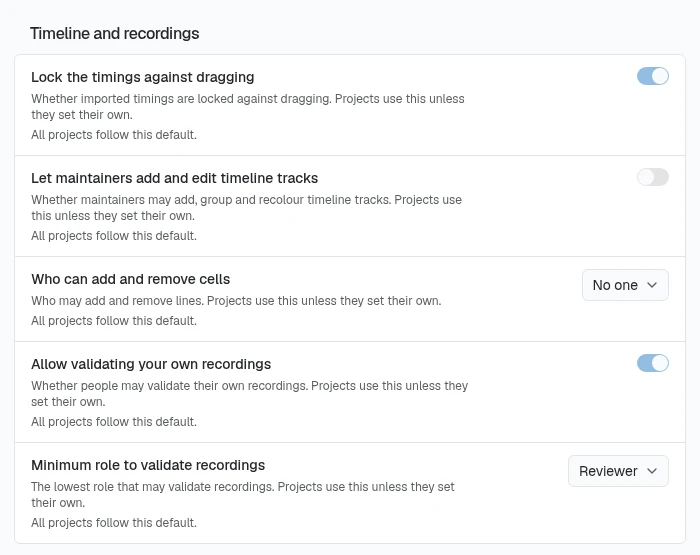
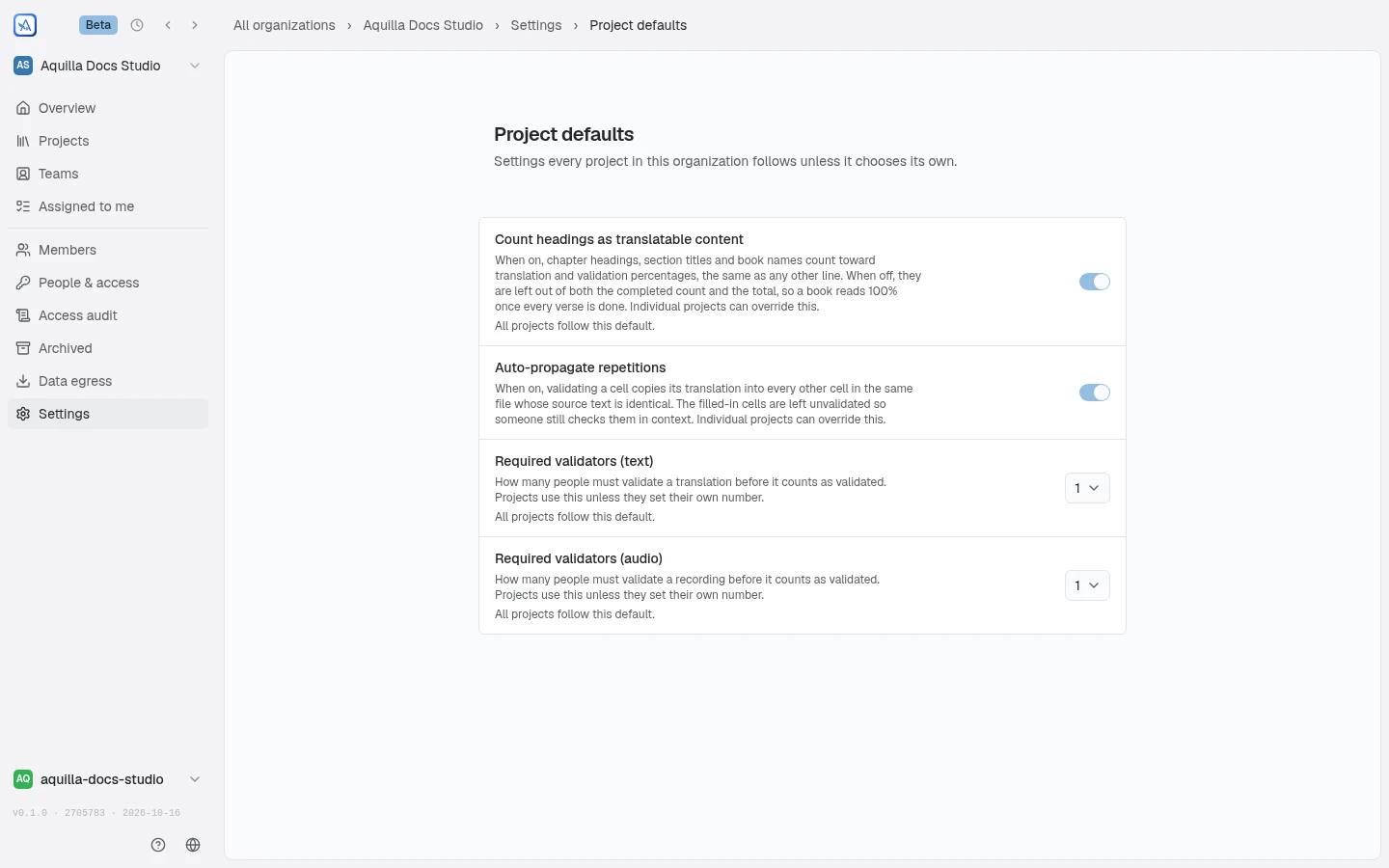
Section titled “Project defaults”Settings every project in the organization follows unless it chooses its own. The page holds four controls, then a Timeline and recordings group. Count headings as translatable content decides whether chapter headings, section titles, and book names count toward every project’s Translated and Validated percentages, or are left out so a book reads 100% once its verses are done. A project can still override this for itself; see Counting structural cells. Changing the org default offers to reset any project that has already set its own override, or to leave those projects as they are. Auto-propagate repetitions decides whether validating a cell copies its translation into other cells in the same file with identical source text; see Repeated source text. Required validators (text) and Required validators (audio) set how many people must validate a translation or a recording before it counts as validated. A project follows the organization’s number (“Organization default”) or sets its own. Under each control the page says “All projects follow this default.” or how many projects set their own, with a Reset to default option for those that did. The Timeline and recordings group holds five more defaults that projects follow unless they set their own: Lock the timings against dragging, Let maintainers add and edit timeline tracks, Who can add and remove cells, Allow validating your own recordings, and Minimum role to validate recordings. A project overrides the timeline ones in Project Settings → Timeline. Only a Maintainer or Owner can change these defaults.
Billing & usage
Section titled “Billing & usage”Plans and AI spend for the whole organization. The page shows your current plan (Free, Field Plan, or Enterprise), a Manage billing link that opens Stripe’s customer portal for anyone already on a paid plan, and a Compare plans link alongside a note for ETEN affiliates and Bible-translation teams to check whether they qualify for covered access.
An AI usage meter shows how much of the organization’s AI for this week has been used, as a percentage, never as an amount, and when it resets. The same meter appears for every member on the organization’s overview and as a small ring in the AI agent panel. A separate AI usage note explains how the allowance works: on a paid plan, “AI capacity resets every seven days from your plan’s activation, with no rollover,” and, as of this writing, “usage measurement is not available yet”; without a paid plan, capacity follows “a rolling seven-day window,” with the note that self-service allowance purchases aren’t available yet. If a plan’s payment has failed or its paid period has ended, the page says so plainly instead of failing silently.
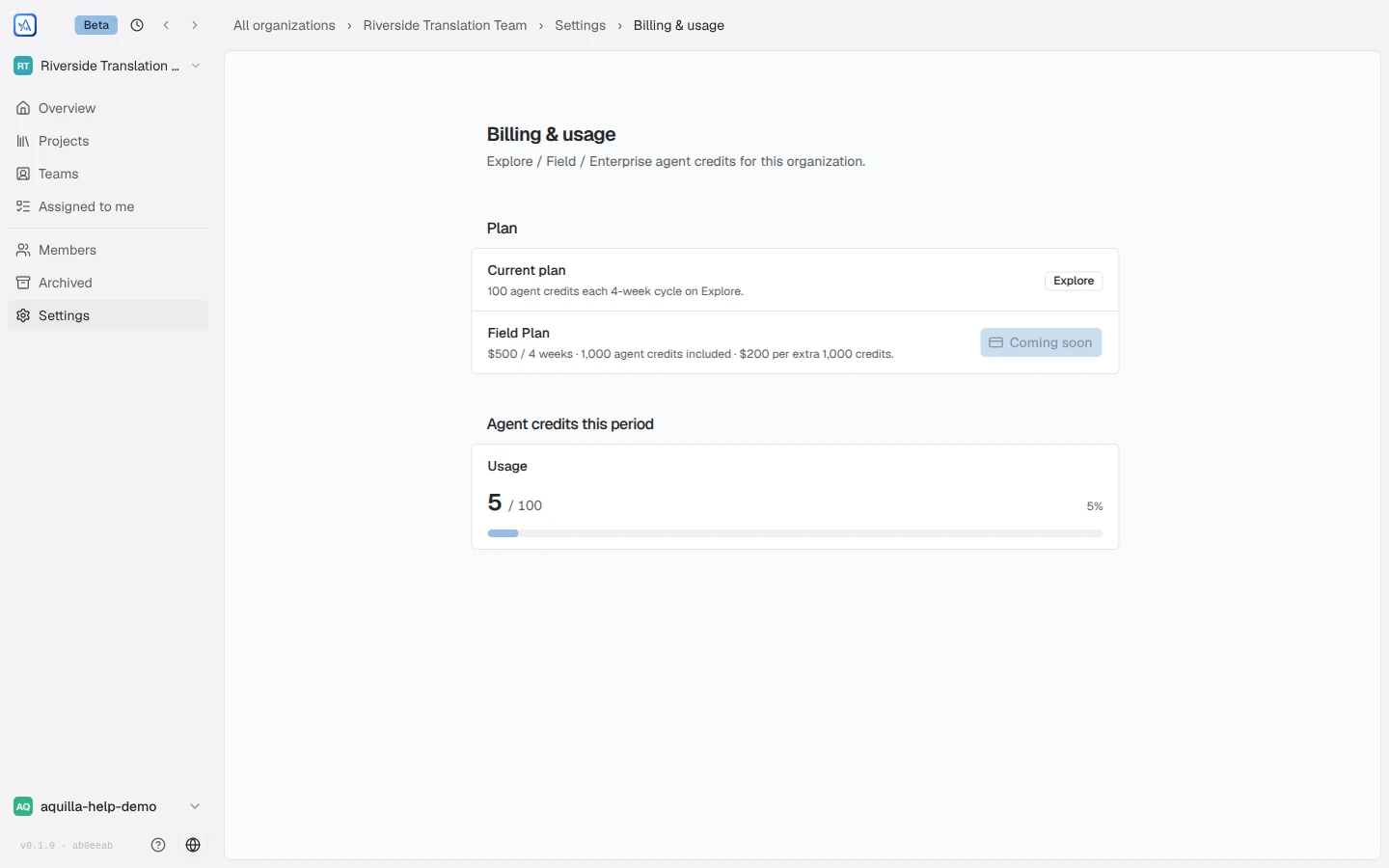
Billing is visible to organization maintainers.
AI provider keys
Section titled “AI provider keys”Org-level provider keys, today a Gemini TTS API key used for Gemini-powered text-to-speech across the organization’s projects. Maintainers and owners only. Individuals can also hold personal keys in their own preferences, and projects configure their AI provider in Project Settings → AI & completion.
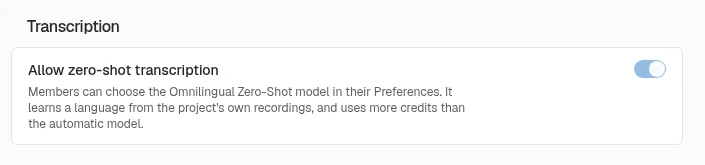
The same page has a Transcription group with one switch, Allow zero-shot transcription. It is on by default, and only organization maintainers and owners can change it. While it is on, members can choose the Omnilingual Zero-Shot model in their Preferences (see Audio & voices). It learns a language from the project’s own recordings and uses more credits than the automatic model. Turned off, no one can choose it.
Knowledge base
Section titled “Knowledge base”Reference documents shared with every project in the organization. Uploads index the same way as a project’s own Knowledge base; documents added here appear in each project’s list as read-only, org-provided material.
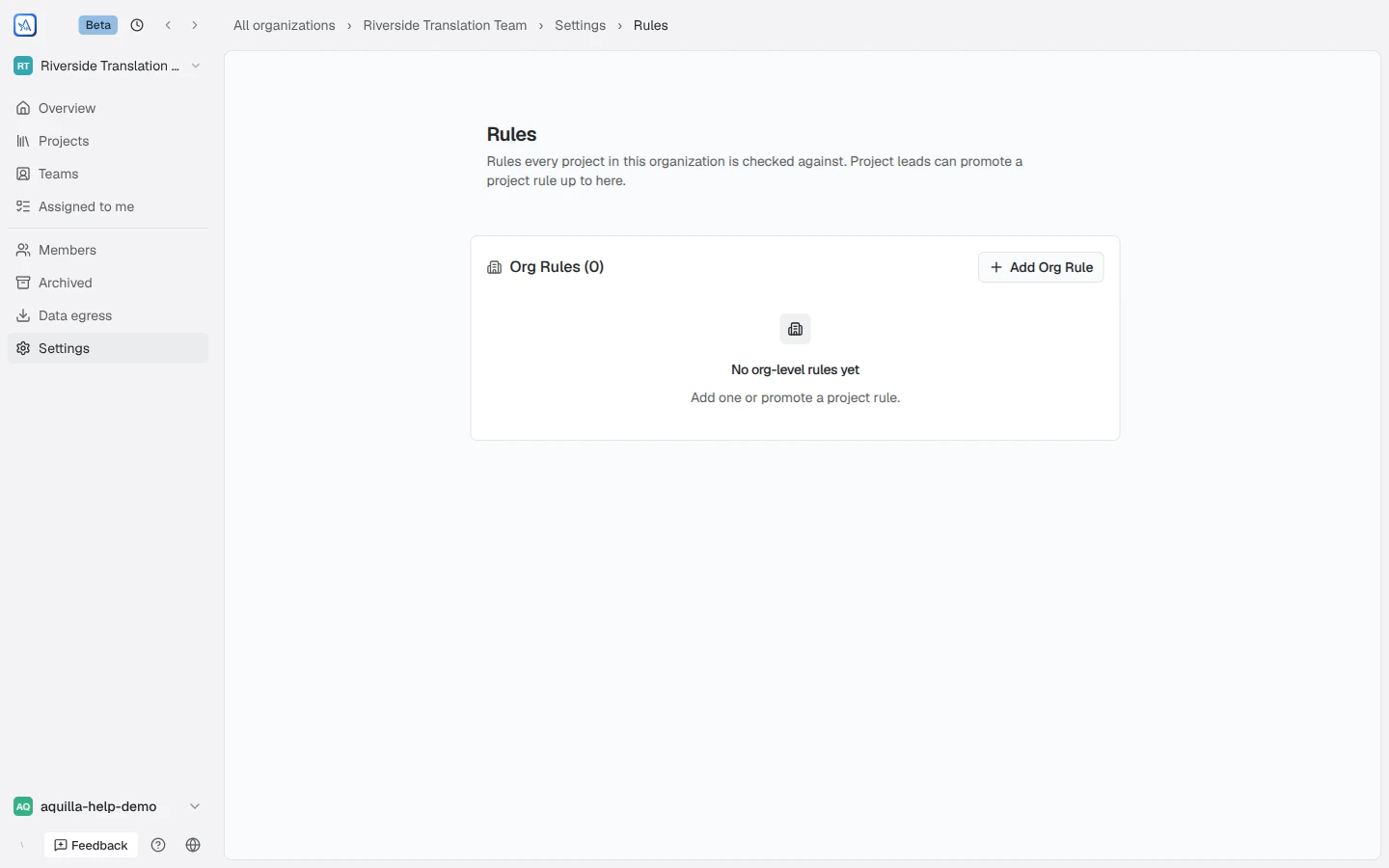
Rules: “Rules every project in this organization is checked against. Project leads can promote a project rule up to here.” This is the same org-rule library described under Living Memory’s Translation quality section, now with a home of its own so an organization sees it on arrival instead of opening some project first. A maintainer or owner can add an org rule directly here, or approve or dismiss a promotion request that a project lead sent up from a project’s own rules: approving copies the rule into the org library (dropping any lane it was pinned to, since an org rule applies everywhere); dismissing clears the request without adding anything. Anyone below Maintainer can see the library but not change it.
Monday.com
Section titled “Monday.com”The organization-level connection that per-project board sync builds on: connect, reconnect when the authorization ages out, or disconnect. The project side is covered in Monday.com integration.
Airtable
Section titled “Airtable”The organization-level connection for per-project table sync: connect with an Airtable personal access token, replace the token, or disconnect. Setup and the project side are covered in Airtable integration.
Help assistant
AI answers from the Aquilla docs — may make mistakes.