
Organization-wide data egress
For pulling one file or one project, see Exporting your work. To take everything your organization has stored at once, across every project, use Data egress.
Where to find it
Section titled “Where to find it”Open Data egress in the org sidebar. The page describes itself as “Everything your organization has stored — review it, filter it, and take it with you as one zip archive.”
An organization owner can always open it. Other roles see it once an owner turns it on for them: Who can use Data egress in organization settings sets the minimum role, from Viewer (“anyone with project access”) up to Owner (the default).
Choosing what to include
Section titled “Choosing what to include”The page lists every file across every project in the organization, with its target lanes and when it was last edited. Tick individual files or Select all files, and type in the filter box to narrow a long list down by name.
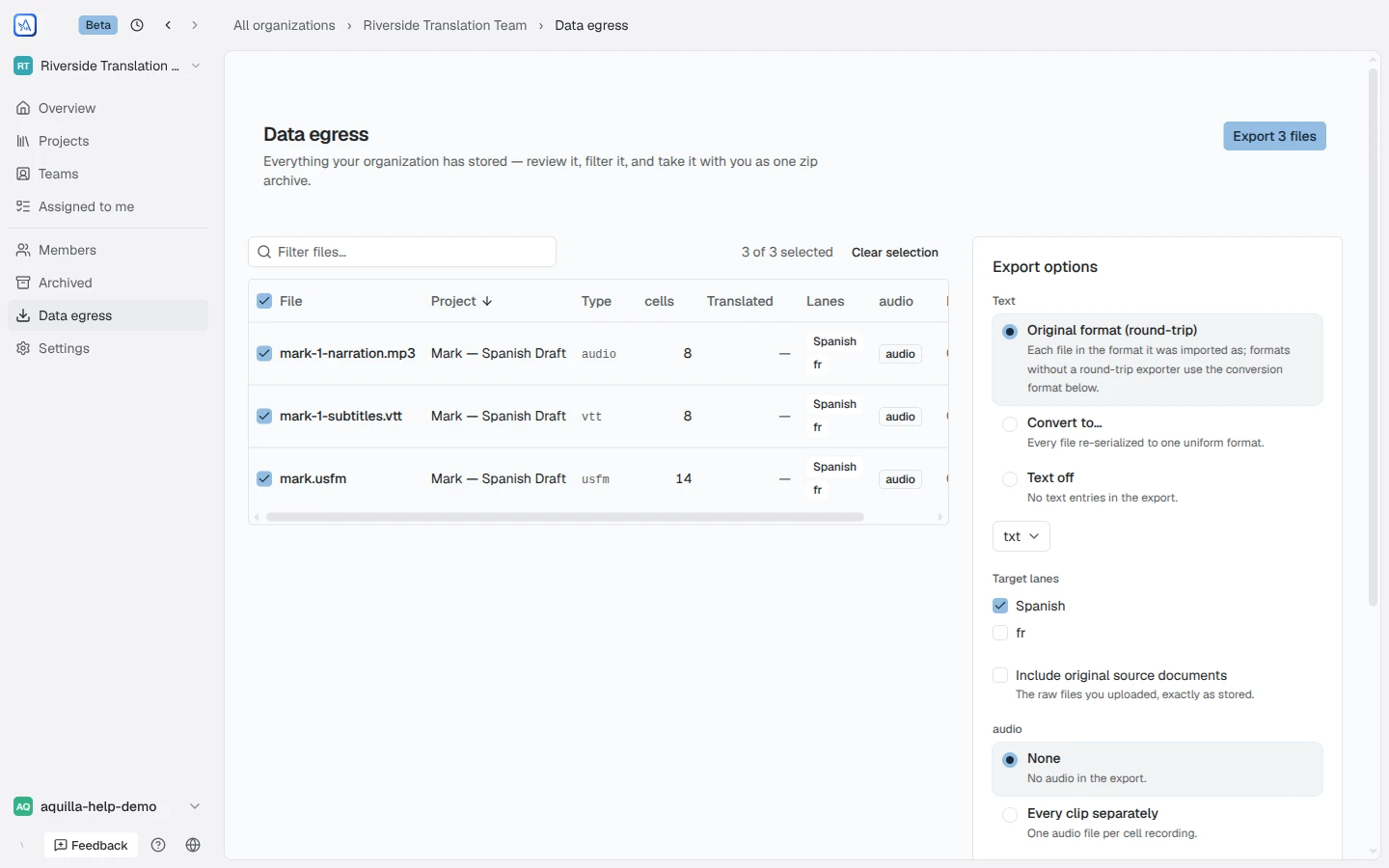
An Export options panel then lets you choose:
- Text export mode: Original format (round-trip) (“each file in the format it was imported as; formats without a round-trip exporter use the conversion format below”), Convert to… a single format for every file, or Text off to leave text out entirely.
- Target lanes: which target-language lanes to include, when a project has more than one.
- Include original source documents: “The raw files you uploaded, as stored.”
- Audio export mode: None, Every clip separately (one audio file per cell recording), One clip per file (a file’s recordings joined in document order), One clip per voice (each voice’s recordings joined together, no gaps), or Voice timeline stems (silence while others speak), one aligned track per voice sharing the file’s timeline. With Every clip separately, a Convert every clip to WAV (16-bit, 48 kHz, mono) box appears; unticked, each clip is copied as it was saved.
- Reuse cached exports for unchanged projects, so re-running the same export doesn’t regenerate work that hasn’t changed.
If your choices would export nothing, for example no lane, no audio mode, and source documents left unchecked, the panel says so instead of letting you download an empty archive.
Downloading the archive
Section titled “Downloading the archive”Export {count} files packages everything you picked into one zip and
starts the download when it’s ready, moving through Preparing,
Exporting text, Exporting audio, Packaging, and Finishing
for each project, with a note when a project’s export came from the cache.
The zip includes a manifest.json at its root recording exactly what was
included, so the archive documents itself.
Two permissions, not one
Section titled “Two permissions, not one”Opening the Data egress page and actually exporting a file are gated separately. Being allowed onto the page doesn’t guarantee every file can be pulled: each project keeps its own export permission, and a file you can’t export there shows Export restricted by org policy here instead of its options.
Help assistant
AI answers from the Aquilla docs — may make mistakes.